Your clients train in your own app
Your coaching moves off WhatsApp. Programmes, meal plans, check-ins, chat and payments, in an app with your logo that your clients use for free. You run it all from a dashboard that tells you who's falling behind.
From €59/month. 10% off for every coach you bring.
Excl. VAT · No minimum term · 2 months free on annual
 Nuria BelloCan I move leg day to Thursday?
Hi, Elena
Monday 27 July · Team Beta
Know another coach who still runs their clients on WhatsApp? For every one who joins with your link and pays, your subscription drops by 10%. With 10, OnTrain is free for you. They start with 30 days on the Elite plan, the trial nobody gets by signing up on their own.
View my linkUrgent alerts2
 Laura Márquez · Bench press3 h agoI feel a sharp twinge in my shoulder on the way down.Handled
 Marc Riera · DeadliftyesterdayI had to stop on the third set.Handled
To review2
- Nuria BelloWeekly check-in · 2 days ago
- Marc RieraWeekly check-in · yesterday
Unread3
- Nuria Belloyesterday1
- Laura MárquezVoice note · 4 h ago2
Check-ins per week
8 wkThursday
Hi, Nuria
Week 6 · Thursday
Heavy push
Session in progress · 2/6 exercises
- Programmes with supersets and drop sets
- Set-by-set logging
- Check-ins with photos and measurements
- Progress charts
- Voice notes
- Meal-by-meal plans
- Card payments, no commission
- Video calls
- Client and programme importer
- Batch invitations
- Offline logging
- Your logo and colour
- Phone notifications
- Team with permissions
- AI assistant
They skip training one Tuesday, then the next. Nobody tells you: you find out when they cancel.
Getting paid means chasingA Bizum here, a bank transfer there, and at the end of the month a spreadsheet to work out who owes you what.
The PDF gets opened onceYou send the programme on Monday and never hear about it again: not what weight they lifted, not whether they made it to Friday.
The history is buriedA voice note lands at 23:40 and, to answer it, you scroll back through six months of chat looking for which knee you were talking about.
Your dashboard
What you'll open every day
You've already seen the dashboard above. These are the two screens where you'll spend most of your time: where you write the programme and where you see how each client is progressing.
Write the programme the way you'd explain it
Drop sets, supersets, to failure, AMRAP, isometrics and cardio, combined however you like and with the weight for every set. What would be a three-minute voice note on WhatsApp is written down in their app.
Multi-week programmes, from the Elite plan
← Laura Márquez
4-day strength
Assigned to Laura Márquez · 1 week · 4 sessions · 18 exercises
Calendar1 wk
+ WeekExercises by session
Week 1
What this session works
Not in this session
- #1130 kg10 repsDelete
- #2100 kg8 repsDelete
- Start with 122 exercises and upload your own videos
- It flags when to increase or reduce the load
- Your client sees on a body map which muscle they're working
A client's silence has a counter
You decide what to ask and how often. If they stop sending their check-in, the counter starts from the first one they skipped: with a weekly check-in, after fourteen days they appear on your dashboard as ‘no reply’. What they do send, weight, measurements and photos, turns into charts.
5 form templates on Base, 15 on Pro, unlimited from Elite
Marc RieraMale
marc@correo.com · Fat loss · 36 years old
Goals
Goals give their progress a direction: without one, the app can't tell whether going up is good.
- Weighttoday 7473kg
- Waisttoday 86.585cm
Weight and measurements
3M6M1YAllWeight
↓ -5.6 kg· closerMeasurements
↓ -4.5 cm· closerWaistProgress by exercise
Max weight, estimated 1RM and volume per logged session.
Best 65 kg × 6 (21/07/26)
Last session 65 kg × 6 · RPE 9 (21/07/26)
Progress comparison
Drag the divider or pick two dates to compare progress.

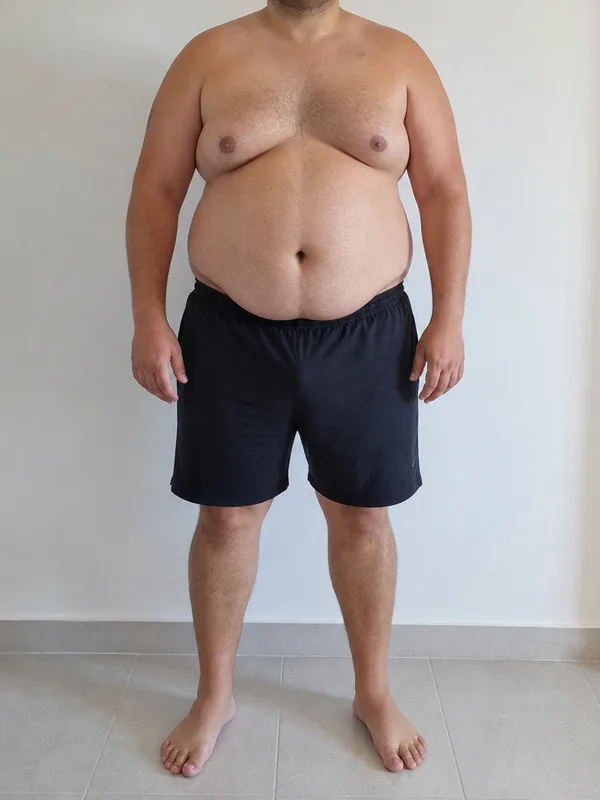
- It tracks whatever you put in the form: weight, measurements, skinfolds or photos
- Renaming a measurement doesn't split its history into two charts
- And it's what you show the client who's wondering whether to carry on
Connect your Stripe and the app takes payments for you
You connect your own Stripe account to OnTrain and the app handles payments: each client has their rate, pays by card from their phone, renewals are charged automatically and everything is recorded on their profile and in Finances. The money goes straight to your account and OnTrain keeps nothing. Stripe charges its fee on every payment, as it does for any business.
Configuration
Settings
Your account, your brand and how your clients see the app.
Payments from your clients
Your clients pay you by card from their app, and every payment is logged automatically on their profile and in Finances.
Your Stripe account
The money goes from your client's card to your Stripe account without passing through OnTrain. OnTrain keeps nothing; Stripe charges its usual fee on each payment.
- · You can't take payments yet: finish setting up Stripe✓ You can take card payments
- · Bank account for payouts missing✓ Stripe pays out to your bank
Your rates
- Monthly online plan€79.00 a monthWithdraw
- Quarterly€210.00 every 3 monthsWithdraw
- One-off check-in€45.00 · one-off payment (1 month)Withdraw
- If their card fails, Stripe retries it and we let you know
- You can pause the app for anyone who stops paying, without deleting anything
- Bizum or bank transfer payments you still log by hand, and they count the same
Some platforms take a percentage of every payment or charge you extra each month just to take payments. Here it's on every plan and the money goes from their card to your account. You still invoice your client yourself: from Finances you download the year's payments for your accountant.
Their app
The app your client opens carries your name
They install it from a link, without going through an app store, and log in with their own account. Your logo and your name sit at the top, and you choose the colour.
They train and log
Set by set, with the weight, reps and RPE, and the exercise video right in front of them. Even without signal.
They eat and shop
Their week's meal plan, meal by meal, what's left to eat today and the shopping list you prepare for them.
They send you their check-in
Weight, measurements and photos, in the form you set. And they see their own charts and their before and after.
The app is free for your client. The only thing they pay is your fee.
Thursday
Hi, Nuria
Week 6 · Thursday
Heavy push
Session in progress · 2/6 exercises
Thursday 30 July
Hi, Nuria
Week 6 · Thursday
Heavy push
Session in progress · 2 of 6 exercises
Thursday 30 July
Hi, Nuria
Week 6 · Thursday
Heavy push
2 of 6 exercisesSee all 6 exercisesContinue sessionThe same Thursday in all three. Voltio is the dark, technical one, with the week in bars; Sereno tells it like a journal, centred and in a serif on paper; Ritmo is the light, sporty one, with the session in a block of colour. Your logo sits at the top of all three.
All three templates from the Pro plan. Colour and logo on every plan
Put your brand on it and watch the phone
These are the same controls you'll have in Settings. Change the name, the colour, the background and the template, and use the app: the menu at the bottom takes you to its five screens.
Name, logo and colour on every plan. Choosing between the three templates, from Pro.
Thursday
Hi, Nuria
Week 6 · Thursday
Heavy push
Session in progress · 2/6 exercises
See all 6 exercises
Harbiz charges extra for the app with your brand, on its ‘My APP’ plan (prices from its website in August 2026). Here your logo, your name and your colour come with every plan, and you've just set them yourself. Compare before you take our word for it.
Your clients, on board this week
Paste the list from your old platform or your spreadsheet: AI tells you which column is which and each person gets their own invitation. Your exercises and programmes import the same way, and each client's programme is ready and waiting when they join.
Moving over
Import
Bring your client list, your library and your programmes from another platform or from a spreadsheet. Clients come in as invitations.
64 rows and 4 columns
Change fileMapping suggested by AI. Check it before importing. 4 left.
What each column is
- AI only suggests which column is which field: you check it before importing
- Each client opens their own account and gives their own consent
- If a link expires, you resend it in one click
Day to day
Everything that reaches you on WhatsApp today
Chat, meal plans and check-in calls move onto the platform, and everything stays on the right client's profile.
Chat, right next to their profile
Text, voice notes and photos, like any messaging app. Alongside is everything you need to reply: their last check-in, the next call, their programme and their macros.
Voice note transcription with OnTrain AI, €69/month extra
- Whatever they flag as urgent mid-workout pops up on your dashboard
- A three-minute voice note reads in ten seconds
- Important notices go separately, with a deadline or a read receipt
Laura MárquezstrengthClientLast check-in
Next appointment
Recent notes
View all- Right shoulder21 JulDiscomfort on bench press above 45 kg. Try dumbbells and shorten the range if it comes back.
- July check-in6 JulLegs progressing well. Wants three strength days in August; keep an eye on sleep.
Active programme
EditDiet macros
A warning nobody else will give you: for the first two weeks your clients will keep messaging you on WhatsApp. What changes is that the programme, the history and the photos no longer live there, so when they message you there's nothing to dig for.
And everything else
Library
Start with 122 exercises and add your own. Your videos are compressed to 720p automatically: a 40 MB iPhone clip ends up at 1.5 MB and plays on any Android.
Clients
You write the sign-up form yourself, with the questions you always ask, and the answers stay on their profile next to your private notes.
Forms
Templates with their own schedule and attachments. Questions reorder by dragging, and you can move a single date without touching the rest.
Team
Team members with per-section permissions, delegated clients, internal chat and time off you approve. €45/month each, on any plan.
No signal
Your client logs their workout in a basement with no signal and it uploads by itself when the signal returns. Videos, mind you, need a connection.
Nudges
If they leave a workout half done, if today's a training day and they haven't opened the app, or if their streak is about to go on Sunday, they get a notification. At most one nudge a day (Sunday's streak reminder is the only exception), and each one can be switched off.
Add-on · €69/month
Ask who hasn't trained and it answers with names
It knows your clients, their programmes, their check-ins, your calendar and your meal plans, and it does things for you: it books a call, adds a note to a profile or adjusts some macros. It works with your permissions, so it never shows a team member anything they couldn't see on their own.
Calendar
Video calls and your notes, all in one place.
- Creates appointments, client notes and days off
- Learns from your instructions and the documents you upload
- The allowance is shared with your team and you can set limits per team member
- If it runs out, the assistant stops until the 1st and everything else carries on
Voice notes you can read
Chat voice notes are transcribed overnight. The next day you read in ten seconds what they told you in three minutes.
Recipes for your client
€29/month extra. A recipe chat inside their app, with their meal plan and macros. Nutrition questions get passed on to you.
You switch it on and off
€69 the assistant, €29 recipes, €89 both. Add or remove them from your dashboard.
You pay for how many clients you coach
Full coaching comes with every plan: programmes, check-ins with photos, chat with voice notes, nutrition, card payments with no commission, the importer, offline mode and your brand in the app. Higher tiers raise the number of clients, hosted videos and form templates; and from Pro, you get your own video room, all three templates and client-base analytics. Multi-week programmes from Elite.
35clients
Your tier is Pro, €109 a month. If you outgrow it, you move up from the dashboard and only pay the difference.
More than 250 active clients? There's no unlimited plan: write to us and we'll talk it through.
Prices exclude VAT. On annual billing you pay for ten months and use twelve. Team members are extra, €45/month each on any plan. OnTrain AI add-ons are added from the dashboard and don't get the annual discount: there's real usage behind them that we pay for every month.
Invite ten coaches and it's free
We have no sales team. You know other coaches who still run their clients on WhatsApp: for every one who joins with your link and takes out a plan, your subscription drops by 10% for as long as they stay subscribed.
30 days on the Elite plan, no card needed: €169 worth of platform to try it with real clients. This page doesn't give it out; a coach who already uses OnTrain does. If you know one, ask for their link before you create your account.
The discount starts when your referral pays their first invoice and lasts as long as they keep their subscription. If they cancel, that 10% comes off at your next renewal and anything already charged stays as it is. It goes up to 100% (we don't pay you money), and any extra referrals cover you if someone leaves. It applies to your plan; team members and AI add-ons are separate. Your link is on your dashboard from day one.
What coaches usually ask
Does my client have to download something from an app store?
No. They open a link, log in with their account and add it to their home screen. From there it works like any other app, with its own icon and notifications. And for anyone who isn't comfortable with phones, the programme prints on a single sheet.
How much does it cost them?
The app, nothing. You pay for the active clients you coach. If you charge your fee by card through the app, that money goes from their card to your Stripe account.
Do you take a cut of what I charge my clients?
No. You connect your own Stripe account to OnTrain (with Stripe Connect) and the app charges your clients for you: the money goes straight to your account and OnTrain takes no percentage. Stripe charges its fee on each card payment, as it does for any business. You still invoice your client yourself; from Finances you download the year's payments for your accountant.
What if I don't have a Stripe account?
You create one when you connect, from Settings: Stripe asks for your details and the bank account where you want to receive the money. If you already use Stripe, you log in with your usual email. For now, for Stripe accounts in Spain.
Can I bring my clients and programmes over from another platform?
Yes. The importer reads the CSV your platform exports, or your spreadsheet: clients, exercises and programmes. AI suggests which column is which field (five uses included) and you check it. Clients come in as invitations and their programme is waiting for them when they accept. What doesn't import is their weight, measurement and photo history: that data is theirs.
What if my clients keep messaging me on WhatsApp?
At first they will. What changes the habit is having the programme, the meal plan, the check-in and the exercise video inside the app: when the place where they train has a chat, that's where the chatting ends up. We don't switch WhatsApp off for you.
Can I use my brand instead of yours?
Yes. Your name, your logo and your colour go on your client's app on every plan and apply instantly. From the Pro plan you also choose between three templates, which change the home screen, the typography and the navigation.
I coach eight clients, not twenty. Is it for me?
The smallest tier is 20 clients for €59 a month, and there's nothing below it. With eight, you'd probably be paying for more than you need. If you know someone who already uses it, ask for their link: you get 30 days without paying and decide with the platform in front of you.
Is there a free trial?
Yes, but it comes from a coach who already uses OnTrain, not from this page: with their link you get 30 days of the Elite plan, no card needed. Without a link, the first month is paid. If anyone could get the trial, another coach's invitation would be worth nothing.
What happens when the 30 days are up?
You're not charged anything, because you haven't left a card. You choose a tier and carry on, or the account is left without a plan. Your clients, your programmes and the history are kept for twelve months in case you come back; after that they're deleted.
How can it end up free?
You have a link on your dashboard from day one. For every coach who joins with it and takes out a plan, your subscription drops by 10% for as long as they stay subscribed, and it adds up: with 10 you pay nothing. It counts from their first paid invoice and applies to your plan, not to team members or AI add-ons.
What happens if I reach my plan's client limit?
You get an email when you pass 80%, and you'll see it in your client list before that. If you move up a plan, the unused part of your previous one is deducted. Moving down doesn't delete anything you had set up.
Are the video calls run by a third party?
They're ours. From the Pro plan, the room is created automatically on our video server when you book the appointment, and it opens in the browser. On Base you paste your Meet, Zoom or Teams link into the appointment and your client joins from their app just the same.
Is OnTrain AI included in the plan?
No, on purpose: that way nobody pays for AI they don't use. The assistant is €69 a month with voice note transcription included; the recipe chat, €29; both, €89. If the month's allowance runs out, the assistant stops until the 1st and everything else works as normal.
Does it work for training without signal?
For logging, yes: your client records their sets even if the gym has no signal and they upload by themselves when the connection returns. The exercise videos, on the other hand, need a connection to play.
Where is my clients' data?
On servers in the European Union, and each coach only sees their own: the database enforces that, not the screen. OnTrain doesn't ask anything about health on its own: if one of your forms does, you mark it and the app asks your client for their explicit consent before they answer it, separate and revocable.
Try it with a real client
Create your account, pick a programme from the catalogue, invite a client and see their logged sets this very week. If another coach has sent you their link, you get 30 days of the Elite plan without leaving a card.
Get started nowNo minimum term: cancel from Settings. Already have an account? Log in